Coming soon to iPhone and Android
Everyone knows what's happening and who's got it.
FairlyFam is a calm, private hub for running a household together. The calendar, chores, lists, meals and school pickups live in one place, and every one of them has a clear owner, so nothing quietly falls through the gaps.
- Coming soon toApp Store for iPhone: join the waitlist
- Coming soon toGoogle Play for Android: join the waitlist
- No ads
- No location tracking
- Free plan for the family
The idea
Owning something isn't the same as doing it.
Most family apps track who ticks the box. The hard part is everything around it: noticing it needs doing, planning it, arranging it and checking it happened. In FairlyFam that work has a name and an owner.
- The owner keeps track. Remembers, plans, arranges and checks, and stays the owner even when someone else does the task.
- The doer does it. The owner or anyone else in the family, and the owner sees when it's done.
- Handovers need a yes. Nobody gets a responsibility dropped on them silently.
- Fair, not competitive. A weekly review shows who's holding what, with no scores, streaks or blame.
Book Maya's dental check-up
- Owner · keeps track
- A Alex
- Doer · makes the call
- J Jamie
- Remember it's due
- Find a time that works
- Book it and add it to the calendar
- Check it happened
The family hub
Everything your household holds in its head, in one calm place
Built for real weeks: two calendars, three kids, one dog, and a grandma who wants to know when the recital is.
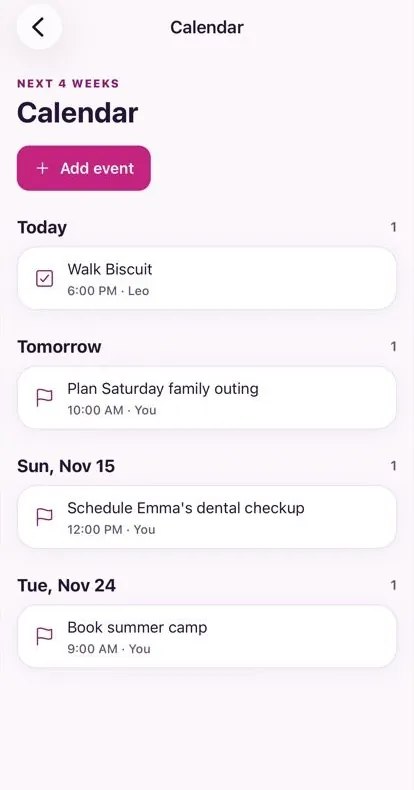
One family calendar
Everyone's events and what's due, together. Colour per person, and Google or Outlook sync if you want it.
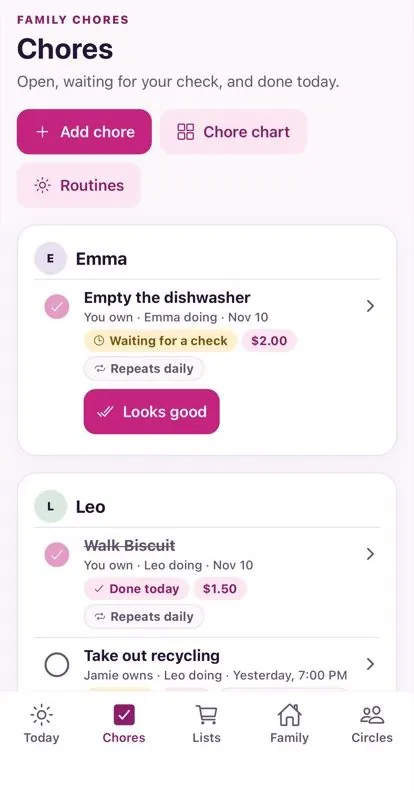
Chores and rewards
Chores that repeat or rotate, stars and rewards, and an allowance ledger. A parent checks before a reward counts.
Lists and meals
Shared lists that work offline. Plan the week's dinners with suggestions that respect every allergy, then send what's missing to the list.
Who's got it
Pickups and drop-offs anyone can claim, swaps that need a yes, and a “Nobody's got it” list so gaps show up before Tuesday at 3.
Gift lists
Birthday and holiday wish lists. Claim a present without the birthday person ever seeing it. Secret Santa draws itself.
Circles and photos
Private, invitation-only circles for family and close friends, with chat and shared albums. Location is stripped from every photo.
Some features, like photo sharing and teen accounts, switch on after launch, once their safety reviews are done. See every feature.
Ask FairlyFam
An assistant that drafts, so you don't have to type
Say it the way you'd say it to your partner. Forward the school newsletter, or snap the party invite on the fridge. FairlyFam turns it into events, to-dos and list items for you to check.
- Drafts events, chores, list items, countdowns and meal ideas
- Reads forwarded emails, PDFs and photos of flyers
- Suggests dinners from your recipe box that respect every allergy
- Never saves, sends or buys anything until a person confirms
Dentist for Maya next Tuesday at 4, and we're out of milk
Here are two drafts. Nothing is saved until you confirm.
Private by design
Your family is not the product
Family life is private. These promises are built into how FairlyFam works, and they hold on every plan.
No ads. Ever.
We don't sell or share your data for advertising, and the app carries no ad, analytics or tracking SDKs.
No location tracking
FairlyFam never asks for your location. Weather uses a town you type, and GPS is removed from photos.
Teens 13+, with a guardian
No accounts under 13. Teens join only with a parent's approval, and parents can't read a teen's private reminders.
AI only drafts
The assistant suggests; a person confirms every change. Names are swapped for placeholders, and nothing is used for training.
After the app
Coming next: FairlyFam on the wall
Phones are for everyone on the go. Screens are for the kitchen, the hallway and Grandma's side table.

The Family Display
A touch screen for the kitchen wall: today and the week at a glance, everyone's chores to tick off, lists, dinner, and who's picking up. Kids can see their day without a phone.
- Pairs with your family in the app; a parent PIN guards changes
- Never shows private items, chat or anyone's photo library
- Optional voice that runs on the device, off until an adult turns it on
- Our Raspberry Pi kit, or any screen with a modern browser

The Grandparent Frame
New photos of the grandkids, their games and recitals, and a countdown to the next visit, on a frame you set up for someone you love. No app, no account and no passwords for Grandma.
- You choose every photo and event it shows, and remove anything instantly
- Grandma can heart a photo to see it more, or hide it
- Dims to a clock at night
Want a display or a frame?
Leave your email and we'll tell you when kits are ready. We're also exploring Care, a simple way for an older relative to call for help from the screen.
Pricing
Free for the family. Plus when you want more.
Plans and prices aren't final yet. We'll confirm them before launch, and neither plan will ever show ads.
Free
$0for the whole family
Everything a household needs to share the load.
- Family calendar with Google and Outlook sync
- Responsibilities with an owner and a doer
- Chores, stars and rewards, allowance ledger
- Shared lists that work offline
- Who's got it: pickups, drop-offs and swaps
- Gift lists and Secret Santa
- Private family and friend circles
Plus
Price TBAper family, billed yearly
For families who want the assistant and the screens on the wall.
- Everything in Free
- Ask FairlyFam, the assistant that drafts for you
- Magic import from emails, PDFs and photos of flyers
- Meal suggestions that respect every allergy
- Family Display and Grandparent Frame features
- More photo storage
Questions
Short, honest answers
When can I get FairlyFam?
The iPhone and Android apps come first, starting with a small private beta. Join the waitlist and we'll email you when you can download it. The Family Display and Grandparent Frame follow the app.
What does “who's got it” mean?
Every responsibility in FairlyFam has an owner, who keeps track of it, and a doer, who does the task. They can be the same person or not. Handing something over needs the other person to say yes, so nothing gets dropped on anyone and nothing quietly falls through the gaps.
How much will it cost?
There will be a free plan for the whole family and a paid Plus plan. We'll confirm what's in each and the price before launch. Neither plan has ads.
Who can have an account?
Adults, and teens aged 13 to 17. Nobody under 13 can have an account. A teen joins their family with an invitation and a parent or guardian's approval, and the guardian chooses what the teen can use.
Teen accounts open after a legal and safety review, so they may arrive after adult accounts. More on children and teens.
Does FairlyFam track my location?
No. The app never asks for your location and has no location sharing. The weather card uses a town you type, and location data is removed from every photo. “I'm home” is a button you tap, not a tracker.
What does the assistant do with my information?
Ask FairlyFam turns plain words, forwarded emails and photos of flyers into drafts. It can't save, send or buy anything; a person confirms every change. Names, emails, phone numbers and addresses are replaced with placeholders before anything reaches the AI model, and your family's content is never used to train it.
Early access
Be first in line
The FairlyFam app is coming to iPhone and Android. Leave your email and we'll let you know the day you can download it. No spam, and no sharing your address.